2009-03-05
2009-02-15
Slice and Export a Website Layout + HTML: Photoshop Tutorial!
Check this video out at Hi-Res here: http://www.tutvid.com/tutorials/photoshop/tutorials/slicingALayout.phpWelcome to this video tutorial! We will learn how to take a Photoshop created web page layout template and slice it into individual pieces and then export it with an HTML file. We will cover user slices, layer based slices, auto slices, naming slices, assigning links to slices, alternate text for slices, creating multiple slices at one time, previewing our file in a web browser, saving individual slices as gifs or jpgs from the same document, and exporting a fully functional HTML file to go along with all of it. Please enjoy and don't forget to check out the site

Create Basic Flash Buttons
Very simple flash tutorial
dreamtube7: Create text flash buttons with hyperlinks. It is important to create an "invisible" button so that the mouse state is always over.
2008-10-11
How To Make A Flash Website
From: dreamtube7 This is a simple straight forward example of how to build a flash website perfect for people who are just starting out with flash.
Create Next / Prev Buttons for Photo Gallery
From: tutvid
This is a response for the Flash Gallery tutorial showing how to create prev and next buttons for the gallery.
2008-07-25
Adobe Flash Tutorial -- Basic animation.
Very Simple tutorial
Visit http://www.omgpcgames.com/Forums for any questions you may have to ask me. Do not PM me on Youtube, register an account, and post in the 'Photoshop / Media Work' Forum.PLEASE VOTE FIVE, IF YOU LIKED IT.I'm looking for more ideas for tutorials.. Please leave recommendations in the comments!--This tutorial quickly goes over onion skinning, layers, embedded animations, motion tweens and finally shape tweens.This isn't an in depth tutorial, but hopefully it might make things a bit easier for you.I apologise if it seems rushed. It was 1:00 AM, and I was in a rush to finish up.
2008-05-30
Dream effect with Photoshop
- Save the following image to your hard disk

- Open the image with photoshop.
- Duplicate layer using menu Layer => Duplicate Layer.
- Use Filter -->> Blur -->> Gaussian Blur.

- Set the radius to 5.0.
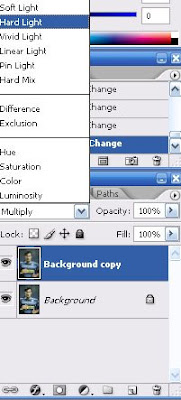
- Change the layer type to Hard light as you can see in the image below.
- See the final result.


2008-05-11
Three methods to make black and white.
Here are three methods that will allow you to make black and white photo with different styles.

Grey Scale:
Here is the easiest method and fastest.
- Open your photo, go to the menu "Image"-->>"Mode"-->>"Grayscale". A window opens and asks if you want to delete much information colors, confirm OK.
Your photo now in black and white.
Many of you will be disappointed with the black and white obtained, I advise you therefore to use the other two techniques.
Using the lightness channel layer:
Another method also fairly simple and gives you a more accurate adjustment.
- Open your photo, go to the menu "Image"-->> "mode "-->> "Lab colors", your photo has been no change visually but in reality you just change it.

The layers:
Here in mode Lab we have three layers but they are different, the first L which is a component of luminance, a component which is the range of colors ranging from red to green and b component which is the gamut from yellow to blue.
- To see the layers open the window layers in the menu "window"-->> " layers " .
- Select the layer L simply by clicking above it, your photo now in black and white.
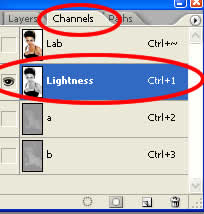
- Go to the menu "Image"-->> "Mode"-->> "Grayscale", a window opens and asks if you want to delete the other layers, confirm OK.
- Now you have a single layer.
- Go to the window layer and duplicate your layer (Ctrl+j).
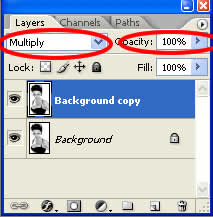
- Now change the layer type to multiply, You will now be able to play on the transparency of the layer to have the result you want.

Using mixer layers:
This is certainly one of the methods which will give you the best results and it remains quite simple.
- Open your photo.
- In the window layers click adjustment layer
 , and click on "Channel mixer."
- To work on our photo in black and white we must check the box at the bottom of the window "Monochrome", then passes the photo in black and white.
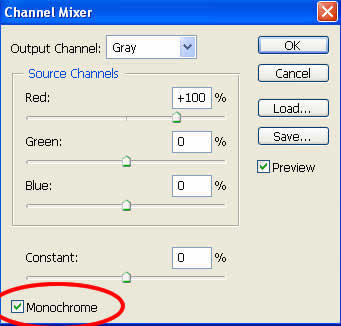
- Play on each slider to get the black and white as you want.


Tip: If you want a Black and White rather classic, the total percentage of layers must be equal to 100%. (eg R: 40% G: 20% B: 40%).
However, you can not respect this rule if you are looking for special treatment.
2008-05-09
3D text with Photoshop (1)

Here's another way to make a 3D text with photoshop, this method is simple and yet it can have different results by changing a few things in its execution.
STEP 1:
I create a new document, 500*500 pxl, By using File-->> New (Ctrl+N).
STEP 2:
I place my text at the centre of my image (I chose a color black), By using Horizontal Type tool (T).  STEP 3:
I rasterize the layer of my text and I called it text1 by using Layer-->> Rasterize-->> Type.
STEP 4:
then I change with the prospect, By using Edit-->> Transform-->> Perspective.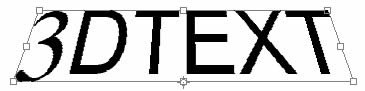 STEP 5:
I use filter-->> Stylize-->> Emboss with the following adjustments:Angle: 110, Height: 6, Amount: 105. 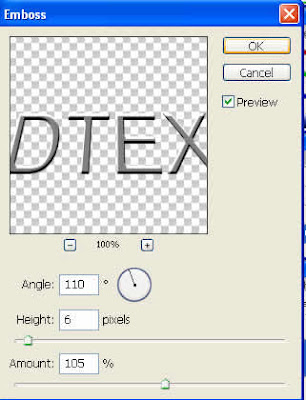 STEP 6:
I will now create my volume, for that I select my text1 layer, and then I take the tool Move (v) and I press alt while pressing the top arrow (about 26 times). STEP 7:
I merges all my by selecting all my layers thin use Layer-->> Mearge layers (Ctrl+E).
Step 8:
Add a drop shadow: distance 50 and size 50. By using Layer-->> Layer style-->> Drop shadow.
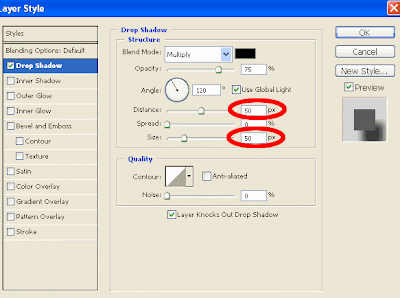 See the final work below:
2008-04-19
Simple Calculator in Flash CS3 with ActionScript 3 Tutorial!
From: tutvid In this video we will start with a blank flash document and build using flash drawing tools and lots of actionscript a simple functioning calculator which performs Addition, Subtraction, Multiplication, and Division. Have fun with this one and learn lots of Actionscript 3.0!
2008-01-09
Create a Photo Gallery and Thumbnails!
From: tutvid We will make a nice little photo gallery in Flash in the following tutorial. All you need are a few images and a few thumbnails for them, the rest is just follow along and it works with any images!
Put this tutorial in your site "copy & past the code"
<a href="http://tutfree.blogspot.com/2008/01/create-photo-gallery-and-thumbnails.html"> <object width="425" height="355"> <param name="movie" value="http://www.youtube.com/v/cylX1lThTN0&hl=en"> </param> <param name="wmode" value="transparent"> </param> <embed src="http://www.youtube.com/v/cylX1lThTN0&hl=en" type="application/x-shockwave-flash" wmode="transparent" width="425" height="355"></embed> </object> <br /> Flash Tutorial :::: Create a Photo Gallery and Thumbnails!</a>
Flash Tutorial Load Website Content Dynamically w/ Actions!
From: tutvid : Welcome to this video tutorial! In the following video we will learn how to load text from a text file sitting on a web server and display it in flash using dynamic text and actionscript. We will also learn how to load jpg,gif,png, and swf files using actionscript. All of the files loaded into our flash movie will be loaded from an external web server! Actionscript 2.0 is the actionscript version used in this video. Please enjoy responsibly and check out the site http://www.tutvid.com
Preloader in Flash Loading bar for your movies! - Tutorial
From: tutvid : Make this simple preloader(loading bar) or take it to the next level with the later part of the tutorial. Hope you enjoy!
Flash Tutorial Create a Drop down menu +link it to websites!
From: tutvid : In this tutorial we will strat from scratch and build a navigation bar and then convert one of the buttons to a drop down button. We will also learn how to link the buttons within the drop down to sites and pages out on the web! Put this tutorial in your site "copy & past the code" <a href="http://tutfree.blogspot.com/2008/01/flash-tutorial-create-drop-down-menu.html"> <object width="425" height="355"> <param name="movie" value="http://www.youtube.com/v/VHVYWcNitq4&hl=en"> </param> <param name="wmode" value="transparent"> </param> <embed src="http://www.youtube.com/v/VHVYWcNitq4&hl=en" type="application/x-shockwave-flash" wmode="transparent" width="425" height="355"></embed> </object> <br /> Flash Tutorial Create a Drop down menu +link it to websites! </a>
Adobe Flash Tutorial! Scrolling Thumbnails w/ Mouse Control!(Video)
From: tutvid : -----We will start with nothing more than a blank Flash document and 10 100px X 100px thumbnails and from that little bit we will construct this sweet scrolling thumbnail bar. This thumbnail bar will move in different directions depending on where the users mouse is. It will also stop when the user rolls onto a certain part of it and each thumbnail will light up as the user rollover each individual thumbnail! Lots to learn! Have fun with this one! Put this tutorial in your site "copy & past the code" <a href="http://tutfree.blogspot.com/2008/01/adobe-flash-tutorial-scrolling.html"> <object width="425" height="355"> <param name="movie" value="http://www.youtube.com/v/2TrIQqu2MkU&hl=en"> </param> <param name="wmode" value="transparent"> </param> <embed src="http://www.youtube.com/v/2TrIQqu2MkU&hl=en" type="application/x-shockwave-flash" wmode="transparent" width="425" height="355"></embed> </object> <br /> Adobe Flash Tutorial! Scrolling Thumbnails w/ Mouse Control!(Video)</a>
2 Flash-animation tutorial for bigener(Video)
Hear are a one flash tutorial in to part. note: this flash tutorial not made by this site owner. hear is the first half: From: xefpatterson ----The first half of a flash tutorial I made for beginners. (its in 2 parts because the quality would have been bad)In the video I forget to say that F7 creates a new blank frame.Hope it helps all those who were asking how I made my animations.And yeah, the program is Macro media Flash Mx 6(sorry for the disturbing noises I had a cold) From: xefpatterson The second half.
2008-01-06
Sites for flash tutorial
Sites for flash tutorial some of my favorites sites w3schools Flash Tutorial Tutorials - ActionScript.org Flash, Flex and ActionScript tutorialized flashperfection flashkit entheosweb echoecho baycongroup Adobe - Flash Developer Center adobe
2007-12-26
SEO glossary
- Benefit statement
- Benefit statements express how your company's product or service solves an immediate need and clarifies a specific unique sales proposition. These statements are written in a "What's in it for me?" fashion where company features are immediately linked to client benefits. Benefit statements may be different for different target groups, depending on their motivations. Typical benefit statements are linked to such bottom-line motivators as: saving time, saving or making more money, helping someone be more attractive to the opposite sex, streamlining operations, gaining new clients, gaining an industry niche or power, et cetera.
- Brochureware
- Brochureware is a negative term that denotes a print brochure being uploaded, without revision, as Web page text. Brochureware is always counterproductive and should be avoided at all costs. It doesn't take into account the interactivity of Web copy, nor is it typically written in a user-centric manner. Brochureware sites tend to see poor search engine positioning until the pages are rewritten for Web conversions.
- Directory
- Directories are compiled lists of sites, categorized and organized by topic. Each directory listing contains short, descriptive information about the site. Unlike spidering search engines (like Google), directories are compiled by human editors who approve listings. The human-involved process obtaining directories listings is far different than with obtaining listings in spider-built search indexes or paid search-advertising engines. In some cases, pay for inclusion is offered for expedited listings in directories such as Yahoo! and LookSmart. The Open Directory Project, on the other hand, is meant to always be free. Strong directory listings are an excellent way your company can increase its link popularity and its Google PageRank. However, a poorly written listing that is submitted to Yahoo! (and subsequently edited or run with ineffective writing or keyword research) can negatively influence a search marketing campaign.
- Call-to-action link
- Otherwise known as a hyperlink. Call-to-action links in Internet marketing campaigns guide the reader to a new action step. Call-to-action hyperlinks could lead a prospect to a new Web page, an email form, a text section within a page or a shopping cart. Correctly written, call-to-action links increase micro-conversion rates and can affect keyphrase relevancy.
- Conversion rates
- Conversion rates are distinct measurements that determine how many of your prospects take your preferred action step. Typically, micro-conversions (for instance, reading different pages on your site, or signing up for a newsletter) lead to your main conversion step (making a purchase, or contacting you for more information).
- Description tag
- The description tag is Meta data that appears if you right click your mouse and click "View Source" on any Web page. This data is written like a marketing statement and should clearly communicate the purpose of the page. Ideally, the description tag should be around 170 characters (with spaces). Depending on the engine, additional characters over 170 may be truncated.
The description is visible on the SERP with engines that support this tag (some search engines, like Google, use a copy snippet for the description).
For instance, the description tag for this page appears like this:
<meta name="description" content="Learn the SEO lingo! This search engine optimization glossary will take the scary out of SEM-speak. Need more help? Contact SuccessWorks today for personalized assistance.">(This description has 173 characters, including spaces.) - Headline
- A headline is a quick-scan way customers can instantly learn your company's main benefits (for instance, "Custom auto parts sale. Free shipping."). Headlines are typically in bolded text, and appear at the top of a Web page. Headlines and subheadlines (see below) are incredibly important for usability; as online readers scan, not read, headlines make the scanning process easier. Further, in code, headlines can be inscribed using HTML heading tags that can influence positioning.
- Indexability
- Otherwise known as spiderability. Indexability refers to if a site can be indexed - or recorded - by a search engine spider. If a site is not indexable, or if a site has reduced indexability, positioning will suffer.
- Hyperlink
- A blue, underlined word or phrase that, when clicked upon, takes users to another Web page, or section within a Web page. Hyperlinks are also known as call-to-action links (see above).
- Keyword (or key word)
- A single word (like travel) prospects would type into a search query box to find products and services like yours. Although keyphrases contain individual keywords, optimizing for keywords is not recommended.
- Keywords tag
- The keywords tag is Meta data that appears if you right click your mouse and click "View Source" on any Web page. Although this tag is not supported in many engines (this is not true with some Trusted Feed campaigns), the keywords tag is a place to highlight your keyphrases and include misspellings.
This data is written like a marketing statement and should clearly communicate the purpose of the page. Ideally, the description tag should be no more than 170 characters (with spaces).
For instance, the keywords tag for this page appears like this:
<meta name="keywords" content="search engine optimization, Internet marketing, XML feed, conversion rates, landing page"> - Keyphrase (or key phrase; also known as a keyword phrase)
- A two- or more-word phrase (like Florida travel) prospects would type into a search query box to find products and services like yours.
- Landing page
- Landing pages are pages that users would click through to from a PPC campaign or XML feed (that is, people "land" on a particular page as a result of search marketing efforts). For best results, these pages are highly targeted for the reader and specific to the PPC ad or feed description (for instance, if a PPC ad advertises a coat sale, sending prospects to the company home page would invoke frustrations and decrease conversions). Rewriting landing pages is one of the easiest ways companies can increase their conversion rates.
- Link exchange
- A link exchange Internet marketing campaign is the process of exchanging hyperlinks with a quality site that is somehow related to a company's product or service. For instance, a public relations agency may link to a search engine positioning firm's article on "PR and SEO marketing." The SEO may then include a link on their site listing the public relations company. Good link exchange vendors can increase a company's PageRank and increase the number of targeted visitors. Poor link exchanges (think $99 "link farms" where a company promises to link your site to thousands of others) can actually harm site positioning.
- SERP
- The SERP is otherwise known as the Search Engines Results Page. This is the page that users see after typing their search query into an engine. Since conversion starts at the SERP, it is an important job of the search marketer to obtain strong call-to-action listings that entice the click.
- SEO (or SEM)
- A form of online marketing, search engine optimization (or search engine marketing) is the process of making a site and its content highly relevant for both search engines and searchers. Successful search marketing helps a site gain top positioning for relevant words and phrases.
- Subheadline
- Like headlines, subheadlines provide quick-scan benefits and instant information. Subheadlines typically begin inner paragraphs, highlighting the following paragraph's main points and benefits. Subheadlines, like headlines, can also be inscribed using HTML Heading tags. When keyphrases appear in the subheadline, positioning for those keyphrases may be improved.
- Title
- The Title tag is Meta data that appears if you right click your mouse and click "View Source" on any Web page. It is
extremely important that every Title tag contains well-researched keyphrases and is written in a way that entices a user to
click thru from the SERP. Ideally, the Title tag should be around 50 characters (with spaces). More characters are acceptable,
but the Title may be truncated if it's over 50 characters. The Title tag is a crucial part of your search marketing campaign -
and every page should have its own Title tag. For instance, the Title tag for this page is:
<title>Search engine optimization and Internet marketing glossary</title> (58 characters, with spaces.) - Trusted feed (see XML feed)
- Spider-built search engines sometimes cannot crawl a Website even though they try and try. Indexing is important to large content providers such as Amazon.com and IBM, but the same problems that affect indexing with smaller sites can be magnified in large, complex sites such as these. To resolve these issues, all major spider-built search indexes offer a fee-based custom crawl service to large content providers. Many of these search engines have taken the service to the streets by partnering with vendors who often operate their own spiders. The vendors automate the crawling process for the engine and feed the data directly into the index entirely on the basis of trust. Beware, not all vendors are alike and some have unsavory pasts.
- Search Engine Result Page
- The search engine results page (SERP) is the first page searchers see when they've entered their query into the search box. This page lists results of the searcher's query, sorted in terms of relevancy. Gaining a page one or two SERP listing is highly desirable for businesses targeting B2B and/or B2C sales.
- SERP
- See Search Engine Results Page
- Search engine optimization writing
- Search engine optimization writing is specialized copywriting that entails weaving keywords and keyphrases into marketing or informational copy. The purpose of search engine optimization copywriting is to gain prime positioning for the desired keyphrases, as well as increase page conversion rates.
- Spam
- Spam is either a shelved potted meat product or an Internet term for unsolicited commercial email. In the case of search marketing, search engines had to put up their guard against overzealous search marketers who bombarded them with massive daily submissions and loaded their pages with keyword junk. These pages are often derided as pollution and described as spammy by search engine "spam police" who remove and blacklist all the spam they find from their indexes. Spam is the excessive use of any single "trick" meant to improve positioning in Internet search engines.
- Spidering search engines
- A spidering search engine (Google for example) is one that uses machines to fetch Websites and record its pages. The database of over 2 billion Web pages in Google's search index was gathered together using Google machines and GoogleBot (Google's so-called "spider" or Web crawler technology).
- Pay for inclusion (PFI)
- Pay-for-Inclusion services are designed for Webmasters that are having trouble getting pages listed in spider-based search engines. A main benefit of PFI is fast respidering (every 48 hours or so), giving site owners and Webmasters instant positioning feedback and the ability to change content frequently. Also, site owners can submit deep-linked pages and be guaranteed that the URL will be included.
The typical PFI program is an annual URL-based subscription with regular refresh cycles and click-based reporting. These programs are highly effective and potent for use in conjunction with seasonal campaign pages. - Pay per Click (PPC)
- Pay per Click is a type of search marketing where advertisers pay a set amount every time their ad is clicked by a prospect (otherwise known as a click thru).
Some search engines, such as Overture, specialize in this type of advertising medium, although pay per click is not limited solely to pay-per-click engines. For instance, Looksmart, a directory, recently changed its business model to pay per click. Also, XML trusted feeds through Inktomi and Fast are sold at a per-click basis. - PPC
- See Pay per Click
- Usability
- Quite simply, usability is making your site easy for your customers to find the exact information they need when they need it. Anything that makes the process slower (like Flash animation served to a dial-up customer) inhibits usability. Conversely, easy, intuitive navigation and strong, informative text enhance usability.
- XML feed
- (see trusted feed)
2007-12-20
3D text with Fireworks.
In this lesson you will learn: How to make the 3D text this time the lesson will be professional, and the text will matches the 3D programs.
In this lesson we will repeat layers and dealing with Fireworks filters attached to the program.
Tutorial begin:
Open the Fireworks program and start work fits 600 × 200 pixels and the background white. Write what you want (YAMON will be used in the lesson) by selecting writing tool and make this text options like the one in the following picture:
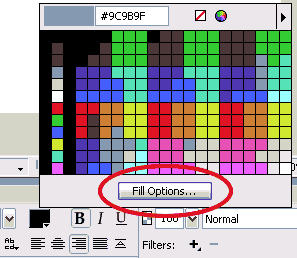

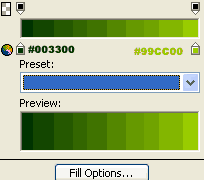 Use Scaling "skew" tool
 to make your work like the one shown in the following picture:
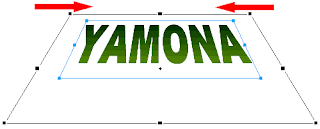 Now make 2 versions of the work through the Edit menu then Clone twice(Ctrl+Shift+D) to get the list of the following layers:
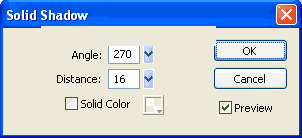
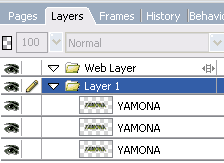 Now locate (select) the middle layer, click on the Filters then Shadow And Glow then select Solid Shadow noted the following image:
 Chose the upper layer and change the color of your text to the White, layer type to Fuzzy light, and chose filter Filters - Blur - Gaussian Blur value 1.4 ... noted the following image of the layer:
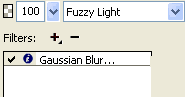 Chose the lower layer ... change the text color to black color filter giving Filters - Blur - Gaussian Blur value 1.2 .. Thus, we obtain the following format for the layers:

 Arabic newspapers
2007-11-24
Converting Bitmap to Vector
First what is "Bitmap"? is an image when you zoom at it will become pixel.
 [Bitmap graphics]
 [Vector graphics]
Third why we need converting bitmap to vector? sometime this will give us a new nice looking, sometime it will reduce the size of the image.
How it can done?
- Import the bitmap image to stage, chose File > Import > Import to Stage, chose the image.
- Don’t forget to select the image if it's not already selected.
- Convert it to vector, chose Modify > Bitmap > Trace Bitmap, click ok.

[Befor converting]

[After converting]
You don it. have fun with flash.


