Please add me to your favorites

Click here to add this page to your favorites
Showing posts with label Bigener flash tutorial. Show all posts

2009-02-15

Create Basic Flash Buttons

Very simple flash tutorial

dreamtube7: Create text flash buttons with hyperlinks. It is important to create an "invisible" button so that the mouse state is always over.

2008-07-25

Adobe Flash Tutorial -- Basic animation.

Very Simple tutorial

Visit http://www.omgpcgames.com/Forums for any questions you may have to ask me. Do not PM me on Youtube, register an account, and post in the 'Photoshop / Media Work' Forum.PLEASE VOTE FIVE, IF YOU LIKED IT.I'm looking for more ideas for tutorials.. Please leave recommendations in the comments!--This tutorial quickly goes over onion skinning, layers, embedded animations, motion tweens and finally shape tweens.This isn't an in depth tutorial, but hopefully it might make things a bit easier for you.I apologise if it seems rushed. It was 1:00 AM, and I was in a rush to finish up.

2008-01-09

Preloader in Flash Loading bar for your movies! - Tutorial

From: tutvid : Make this simple preloader(loading bar) or take it to the next level with the later part of the tutorial. Hope you enjoy!

2 Flash-animation tutorial for bigener(Video)

Hear are a one flash tutorial in to part. note: this flash tutorial not made by this site owner. hear is the first half: From: xefpatterson ----The first half of a flash tutorial I made for beginners. (its in 2 parts because the quality would have been bad)In the video I forget to say that F7 creates a new blank frame.Hope it helps all those who were asking how I made my animations.And yeah, the program is Macro media Flash Mx 6(sorry for the disturbing noises I had a cold) From: xefpatterson The second half.

2007-11-24

Converting Bitmap to Vector

First what is "Bitmap"? is an image when you zoom at it will become pixel.

[Bitmap graphics]

Second what is "Vector"? as an image when you zoom at it will always have the same smooth look "Appearance".

[Vector graphics]

Third why we need converting bitmap to vector? sometime this will give us a new nice looking, sometime it will reduce the size of the image.

How it can done?

  • Import the bitmap image to stage, chose File > Import > Import to Stage, chose the image.
  • Don’t forget to select the image if it's not already selected.
  • Convert it to vector, chose Modify > Bitmap > Trace Bitmap, click ok.

[Befor converting]

[After converting]

You don it. have fun with flash.

2007-11-23

Glow text animation

To create the text animation:

  • start flash program.
  • choose file-->new and click ok.
  • choose modify-->document or press"Ctrl+j".Change the size to 400 * 200.
  • chose Text Tool or press "t".
  • click on the stage and start typing for example "flash text animation".
  • change the font, size, color of the text if necessary.
  • select the text and press "F8" to convert it to simpol, name it text_mc, chose movie clip and click ok.
  • right click on frame 40 and chose insert keyframe.
  • right click on any frame between frame 1 and frame 40 and chose create motion tween.
  • select frame 40 then select the text.
  • chose filter tab, click on the plus button to add a filter, chose glow, mack blur x and y option about 19.
  • right click on frame 1, chose copy frame.
  • right click on frame 80, chose paste frame.
  • right click on any frame between 40 and 80, chose create motion tween.
  • make the frame rate from propriety panel 40.

Tip:

you can chose any other filter instead of glow"tray it"

have fun.

Working with flash timeline

View the Timeline

To view the timeline selecte frome the main menu Window-->Timeline. View the Timeline

What is the Timeline

The timeline store most the animation information on it.Like how many frame "shoots" on the movie, what is the type of animation"Ex..shape tween and motion tween."

Component of the Timeline

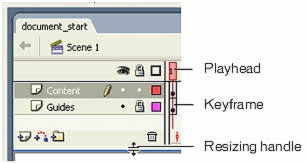
the Timeline
  • Playhead: drag it along the timeline frames to see the animation on the stage.
  • Keyframe: look like rectangle has a black dot circle on it.
  • Resizing handle: use to resizing the timeline panel by click and drag it up and down.
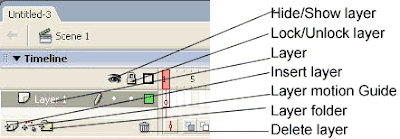
Component of the Timeline
  • Layers: represent transparent sheets lay over each other.
  • Insert layer: add new layer above the selected layer.
  • Layer motion guide: add a motion guide which help you to create an animation movement around a path you draw in this layer guide.
  • Layer folder: create anew folder which content a group of layers to help you organize your layers in category group.
  • Delete layer: delete the selected layer
  • Hide/Show layer: hide or show all the layers. If you click the dot under this button you will hide or show only the layer you click the dot in front of it.
  • Lock/Unlock layer: lock or unlock all the layers. If you click the dot under this button you will lock or unlock only the layer you click the dot in front of it.

Create frames

to craete a blank keyframe: right-click on any frame--> choos insert blank keyframe.

to craete a keyframe: right-click on any frame--> choos insert keyframe.

to craete just a frame: right-click on any blank frame--> choos frame.

2007-11-19

Using Layers : Bigener tutorial

What is layers?

Layers are a transparent sheets placed over each other. Separated from the existing object. At the same time make orderly object over each other.

Layers also help you to work different animations in each layer. Each animation is not related to the other.

Where is the layers?

At the first when you create new document in flash there will be one layer named layer 1 in almost the upper left hand on the flash screen. layers

How you can add a new layer?

One click on the insert layer button. Insert Layer

How you can rename the layer?

Double-click on the layer name, rename it.

rename the layer

How you can delete the layer?

Select the layer you want to delete "one click on it", click on Delete Layer button. Delete Layer

Notes: if you have only one layer you can delete it.